Homechevron_rightGuideschevron_rightEmail via your own mail server
Guests and email
Email via your own mail server
schedule2 min readupdateUpdated 13 November 2026
Email via your own mail server
If you want emails to your guests to come from your own email address, enter your mail server details under Mail settings. If you do nothing, emails are sent through Bookedin.
languageThe screenshots show Bookedin in Dutch. Switch the app to English with the language menu at the top right; the button names in this guide are the English ones.
What you need
checkThe SMTP details from your email provider: server, port, encryption, username and password. You can get them from your hosting company or email provider.
1
Open Mail settings
In the menu, go to Guests and then Email templates. At the top, under Calendar, choose the calendar. Click the Mail settings tab.
2
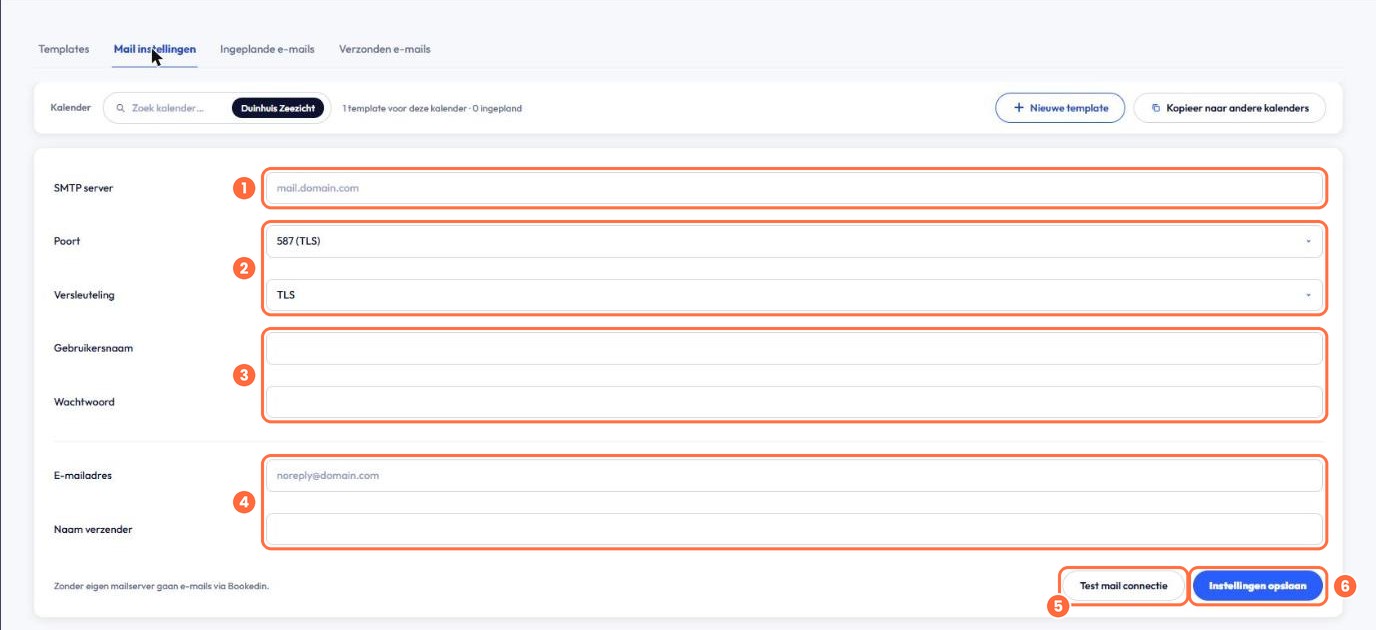
Enter your mail server details
1
SMTP server. For example mail.jouwdomein.nl.
2
Port and Encryption. Port 25, 465 (SSL), 587 (TLS) or 2525, with TLS, SSL or None as the encryption. Use whatever your provider specifies.
3
Username and Password for your email account.
4
Email address and Sender name. Your guests see this as the sender.
5
Test mail connection. Check that Bookedin can log in to your mail server.
6
Click Save settings.
check_circle
Done! From now on, emails to your guests are sent via your own mail server.